


נוסחת ה-Holographic Reveal: המדריך המלא ליצירת פרסומות מוצר ב-AI
נוסחת ה-Holographic Reveal: המדריך המלא ליצירת פרסומות מוצר ב-AI
בעולם השיווק של 2026, היכולת לעצור את הגלילה (Stop-Scroll) היא הנכס הכי יקר שלכם. פרסומת מוצר שכוללת אינפוגרפיקה עתידנית והולוגרמות היא הדרך המהירה ביותר לייצר תפיסת פרימיום למותג – מבלי להוציא עשרות אלפי שקלים על אולפנים ועורכים.
הנה השיטה שלי, שלב אחר שלב:
שלב 1: פיצוח ה-DNA הוויזואלי (ChatGPT)
הסוד לדיוק הוא לא לנחש מה לכתוב, אלא לתת ל-AI לנתח את מה שאנחנו אוהבים.
מצאו תמונת רפרנס של אינפוגרפיקה עתידנית שאהבתם (למשל: בסגנון "טקסטורה טכנולוגית" או "ממשק עתידני").
העלו את התמונה ל-ChatGPT והשתמשו בפרומפט הזהב הראשון שלנו.
Create a high-end futuristic product specification poster for [PRODUCT NAME], a [TYPE OF PRODUCT].
The image should look like a premium commercial advertisement mixed with a futuristic technical blueprint.
Composition:
The product is placed in the center as the hero object, ultra-detailed and photorealistic.
The camera angle is cinematic and dramatic, showing the product clearly and elegantly.
Background:
Dark minimal background with soft gradients and glowing blue / cyan holographic interface graphics.
Add subtle light rays and volumetric lighting to create depth.
Title:
At the top of the image place a bold modern headline:
"[PRODUCT NAME]"
Feature Callouts:
Add 3–5 feature highlights connected to the product with thin futuristic pointer lines.
Features:
• [FEATURE 1]
• [FEATURE 2]
• [FEATURE 3]
• [FEATURE 4]
• [FEATURE 5]
Visual Effects:
Add transparent blueprint-style rings, wireframe overlays, holographic UI elements, subtle data graphics and glowing technical diagrams around the product.
Lighting:
Cinematic studio lighting, soft reflections, rim lighting, subtle glow, premium commercial lighting.
Typography:
Modern bold sans-serif font, clean layout, minimal design, high readability.
Mood:
Sleek, luxurious, high-tech, futuristic, minimal and professional.
Output:
Ultra realistic, extremely detailed, premium advertising poster, vertical composition, 4K quality.
שלב 2: יצירת חומרי הגלם (Gemini / Midjourney)
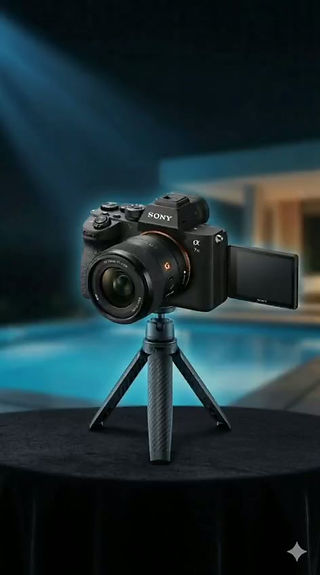
כדי לייצר את אפקט ה"התגלות" (Reveal), אנחנו חייבים שתי תמונות שהן "תאומות סיאמיות" – אחת עם האפקטים ואחת נקייה.
התמונה הצבעונית: הזינו את הפרומפט שקיבלתם משלב 1 וצרו את הפוסטר המלא עם האינפוגרפיקה (למשל בצבעי ניאון).
התמונה הנקייה: בקשו מה-AI את אותה תמונה בדיוק, באותה זווית ותאורה, אבל ללא האינפוגרפיקה. רק המוצר והרקע.
שלב 3: זיקוק ה-Motion DNA
עכשיו אנחנו צריכים להסביר למחולל הווידאו איך אנחנו רוצים שההולוגרמה "תידלק" על המסך.
העלו את שתי התמונות (הנקייה והצבעונית) חזרה לצ'אט.
בקשו ממנו לתאר את תנועת המצלמה והופעת השכבות.
פרומפט להנפשת אינפוגרפיקה: Prompt
Cinematic futuristic product reveal animation based on the original image of the Sony camera on a small tripod.
The scene begins as a clean professional product shot with natural studio lighting and a shallow depth of field.
After a moment, a faint blue scanning light sweeps across the camera from left to right.
As the light passes, a holographic platform slowly materializes under the tripod, forming glowing circular HUD rings and transparent technical grids.
The platform builds itself layer by layer with soft neon blue light.
Thin holographic lines begin extending outward from the camera body, connecting to different parts of the camera.
Infographic elements animate in one after another:
• feature labels fade in
• pointer lines extend smoothly toward the lens, sensor area and screen
• circular UI graphics rotate slowly behind the camera
• small technical icons appear and pulse with light
The camera itself performs a very subtle cinematic micro-rotation of about 5 degrees, giving the product a premium reveal effect.
A slow cinematic push-in camera movement begins, bringing the viewer closer to the camera.
The screen on the camera powers on and displays a futuristic interface.
Additional holographic rings orbit slowly around the camera body like a digital blueprint visualization.
Soft volumetric light beams and glowing particles add depth to the scene.
All interface graphics glow in cyan / neon blue tones, minimal and elegant.
The product itself stays stable and sharp while the holographic infographic system animates around it.
The animation feels like a luxury technology commercial for a professional camera.
Ultra realistic, smooth motion, futuristic HUD graphics, clean commercial aesthetic, cinematic lighting, premium tech advertisement.the holographic interface activates in synchronized pulses with subtle light waves
Model
שלב 4: שלב הקסם - Video Frame to Frame
עוברים למחולל הווידאו (Higgsfield / OpenArt AI / Kling).
בחרו באופציה שנקראת Frame to Frame (או Start/End Frame).
Start Frame: העלו את התמונה הנקייה של המוצר.
End Frame: העלו את התמונה עם האינפוגרפיקה.
הדביקו את פרומפט ההנפשה משלב 3 בתיבת הטקסט.
לחצו על Generate.
טיפ של אלופים:
כדי שהסרטון יראה באמת יוקרתי, שימו לב שצבעי הניאון של האינפוגרפיקה "צובעים" קצת את המוצר בתמונה הצבעונית. זה גורם להולוגרמה להיראות כאילו היא באמת מקרינה אור על המצלמה או האביזר שלכם.
רוצים לראות עוד שיטות עבודה מתקדמות ב-AI?
עקבו אחרי באינסטגרם: sap.adler
מוזמנים להכנס וללמוד עוד טריקים בקורס האונליין שלי : לינק לקורס
דוגמאות :



Comments